|
|
Module for the creation of cabinet structures with simple commands.
It is possible to change the dimensions of the elements which compose the cabinet structure also after their insertion
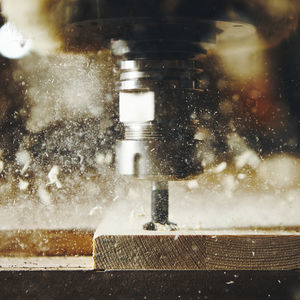
Automatic creation of file instruction for CNC machines of every brand, to obtain the following machinings: dowellings, groovings, cutting with saw and parametric drillings
Cutting list with automatic labels of components
|
|
Patio Designer allows you to create the perfect patio and so much more – including walkways, driveways, garden walls, edging and borders.
* Place pavers or slabs in a defined shape – circle, rectangle or line – or create a free-form design
* Modify the size, shape and placement of your patio with ease
|
|
|
|
|
|
Version suitable for bespoke furniture manufacturer. No limits for objects and space creation.
The assembly module and the archives of Kitchens, Bathrooms, Living-rooms, bedrooms, sitting-rooms, halls and Offices with more than 10.000 graphic elements enables the user to create every living space.
This version allows also the creation and management of every cabinet structure. It comprehends all standard CAD commands to create bidimensional and threedimensional objects, 3D specific functions for a fast creation of furniture pieces, management of cabinet structures of any type, specific functions to obtain shaped, sloped, warp cabinet structures, complete management of colours, texture and effects, printing with Free Hand effect and a high quality render for a high level photorealistic effect.
It is available in two versions:
- JOINERY 1: it contains warehouse requirements, bar code labels creation, orders to raw material suppliers, bill of materials, production report and assembly scheme (exploded view);
- JOINERY 2: it comprehends the version JOINERY 1 and the management of standard or structured codification, private data, printing and utilities, production report for phase, management of edging and veneering lists and panels optimization for pantograph and cutting machine.
|
|
|
|
|
|
This version is created for industries of mass production, which usually need out of size and special pieces. No limits for objects and space creation.
The assembly module and the archives of Kitchens, Bathrooms, Living-rooms, bedrooms, sitting-rooms, halls and Offices with more than 10.000 graphic elements enables the user to create every living space.
This version allows also the creation and management of every cabinet structure. It comprehends all standard CAD commands to create bidimensional and threedimensional objects, 3D specific functions for a fast creation of furniture pieces, management of cabinet structures of any type, specific functions to obtain shaped, sloped, warp cabinet structures, complete management of colours, texture and effects, printing with Free Hand effect and a high quality render for a high level photorealistic effect.
It is available in two versions:
- INDUSTRY 1: it contains the Management of production report, hardware, polishings, bar code labels and volumes and weights, Management of loads, models and series, advanced quotations in more languages and currency, standard or structured codification, private data, deliveries, orders, orders to suppliers, control of clients quotations and orders, printing of price list with icons, printings and utilities and bill of materials.
- INDUSTRY 2: it comprehends the version INDUSTRY 1 and the Management of Warehouse (load an discharge, stocks, reorder quantity, etc...), cutting list, withdrawal list, working cycles, costs management, management of raw materials and semi-manufactured and warehouse turnover.
|
|
This version allows the creation and management of every cabinet structure.
With a very good render, it has an advanced photo-realist elaboration.
This version comprehends the Assembly module and the Archives of:
-Kitchens
-Bathrooms
-Living-rooms, bedrooms, sitting-rooms, halls
-Offices
Archive with more than 100 door models models classic ad modern
Use of colours and texture
Archives of doors and windows
Function “Out of size” by dimension
Dimensioning functions
Manual and Automatic Dimensioning of elements
Insertion of lights
Navigation camera
Printing with possibility of “free hand” effect
Render and advanced photo-realistic elaboration
Module for the management of Quotations and Orders to suppliers
Management of showroom, price lists and suppliers graphic catalogues
Import/Export of files DXF, 3DS and WRL (VRML)
Management of cabinet structures of any type;
Specific functions to obtain shaped, sloped, warp cabinet structures
|
|
|
TurboCAD Furniture Maker is a special plug-in for the creation of interiors and for generating furniture sets in TurboCAD with a menu of outputs suitable for the production of furniture and information on prices of consumed materials for custom orders, including optimization of sectioning plans of surface area material.
|
|
Create your interior design and impress your clients
ARCHLine.XP Interior is a software that you can use to create your interior design including 3D model, the whole technical documentation, quantity take-offs, photorealistic images, and 3D movies.
Use objects online
ARCHLine.XP Interior is integrated with Google 3D WarehouseTM web portal. This integration means that the selected model can be inserted directly into an ARCHLine.XP project and ARCHLine.XP object library. Explore the Google 3D Warehouse
Compare versions and purchase
See a side-by-side comparison of ARCHLine.XP Interior free and ARCHLine.XP Interior Pro. Compare
|
|
Drafting, Detailing, and Superior Work Flow. Works like AutoCAD LT®. But better. It's the CAD of choice for Google™ SketchUp™ users and a great companion to AutoCAD® if you're looking for an extra CAD seat. The better way to create 2D detailed drawings. Contains innovative, powerful features like D-Cubed constraints, automatic drafting detail (associative), a range of parametric architectural objects, and twice as many CAD and graphic file filters as AutoCAD LT® (including .DWG and outstanding .SKP compatibility)... all for about half the price. From the makers of award-winning TurboCAD®, with over two million copies sold worldwide.
Now comes bundled with a free copy of Corel Designer Technical Suite X4!. Bundled offer good through February 15, 2010.
|
|
|
Packed with hundreds of professional drafting tools, TurboCAD® 16 Designer 2D is a complete CAD software solution - the most value-added, beginner-level 2D CAD software available. Use it to quickly and easily create precision home plans, technical drawings, illustrations, maps, flow charts and more. You'll be designing fast using the familiar Windows® like environment with tools so easy to use. Full of versatile tools and flexible file formats, TurboCAD Designer is perfect for all your projects at home and at the office. Use it to create floor plans, mechanical parts, models, woodworking, quilt patterns, deck plans, stained glass projects, furniture making, remodeling, maps, logos, garden planning and more.
|
|
Powerful and simple to use, TurboCAD® Mac Designer 2D delivers comprehensive drafting and design tools typically found in professional level CAD programs. Explore your ideas using intuitive design tools, automated user tips and customizable keyboard shortcuts. Produce anything from simple sketches to standards compliant, production ready drawings.
Perfect For
Architects • Engineers • Builders • Designers • Contractors • Illustrators • Educators • Students • Hobbyists
System Requirements
Minimum Requirements
• G4 • 256 MB of RAM • 200 MB Free on Hard Disk • DVD-ROM Drive • Macintosh OS X (10.4 or greater) 16 MB • Accelerated video card with OpenGL support
Recommended Requirements
• Mac OS X 10.4 or later PPC/Intel • 1 GB RAM • 250 MB Free Hard Drive Space • Internet connection and service to access some online content
|
|
|
|
|
|
urboCAD® 16 Deluxe 2D/3D gives you unlimited design options. Packed with hundreds of professional drafting tools, incredible file support, video and interactive tutorials, photorealistic rendering and millions of symbols, TurboCAD Deluxe delivers everything you need. Create presentation-ready home plans, technical drawings, mechanical designs, artistic illustrations, crafts, school projects and more. TurboCAD's LightWorks® photorealistic rendering allows you to create stunning, life-like visualizations of your designs. Previous CAD experience is not required. TurboCAD Deluxe is backed by an extensive support network of user forums, newsletters, training materials and online resources. TurboCAD Deluxe is the smart choice for consumers looking for a high-quality, all purpose CAD application.
Perfect For
Architects, Engineers, Hobbyists, Contractors, Builders, Designers, Illustrators, Students, Educators, Graphics Designers
System Requirements
In order to run TurboCAD® 16 Deluxe 2D/3D, your system must include the following -
|
|
TurboCAD Pro 16 Architectural Edition is a premium solution for design experts, with added tools tailored to ease design for architects, builders, and civil engineers. Built on the complete 2D drafting and 3D surface and solid modeling toolset of TurboCAD Pro, it includes many of the most advanced technologies in the industry—ACIS® solid modeling, D-Cubed constraints, and Lightworks® photorealistic rendering.
* Surfaces and ACIS® solid modeling
* D-Cubed constraints
* Lightworks® photorealistic rendering
* Powerful Drafting Palette & Part Tree
* Advanced architectural design tools
|
|
|
|
|
|
TurboFLOORPLAN 3D Home & Landscape Pro is award-winning design software, with everything you need to visualize and design your dream home and outdoor living spaces. Increase the value of your home by updating your kitchen or bathroom. Be your own interior decorator applying real world colors, materials and custom lighting to walls, furniture and cabinets. Create beautiful landscapes with gardens, pathways, deck or patio choosing from 2,000 plants. Then take a virtual walkthrough and see your designs in photorealistic 3D. Even reduce your energy bills and fight global warming with new “Green Home”. Simply dream it and design it in TurboFLOORPLAN 3D!
Overview
TurboFLOORPLAN 3D Home & Landscape Pro is award-winning design software, with everything you need to visualize and design your dream home and outdoor living spaces. Increase the value of your home by updating your kitchen or bathroom. Be your own interior decorator applying real world colors, materials and custom lighting to walls, furniture and cabinets. Create beautiful landscapes with gardens, pathways, deck or patio choosing from 2,000 plants. Then take a virtual walkthrough and see your designs in photorealistic 3D. Even reduce your energy bills and fight global warming with new “Green Home”. Simply dream it and design it in TurboFLOORPLAN 3D!
Perfect For
Architects, Illustrators, Contractors Builders, Hobbyists, Designers, Educators, Engineers, Students and Others.
|
|
| ... products without information |
| |
Module for the creation of cabinet structures with simple commands.
It is possible to change the dimensions of the elements which compose the cabinet structure also after their insertion
Automatic creation of file instruction for CNC machines of every brand, to obtain the following machinings: dowellings, groovings, cutting with saw and parametric drillings
Cutting list with automatic labels of components
|
|
|
|
|
|
Version suitable for bespoke furniture manufacturer. No limits for objects and space creation.
The assembly module and the archives of Kitchens, Bathrooms, Living-rooms, bedrooms, sitting-rooms, halls and Offices with more than 10.000 graphic elements enables the user to create every living space.
This version allows also the creation and management of every cabinet structure. It comprehends all standard CAD commands to create bidimensional and threedimensional objects, 3D specific functions for a fast creation of furniture pieces, management of cabinet structures of any type, specific functions to obtain shaped, sloped, warp cabinet structures, complete management of colours, texture and effects, printing with Free Hand effect and a high quality render for a high level photorealistic effect.
It is available in two versions:
- JOINERY 1: it contains warehouse requirements, bar code labels creation, orders to raw material suppliers, bill of materials, production report and assembly scheme (exploded view);
- JOINERY 2: it comprehends the version JOINERY 1 and the management of standard or structured codification, private data, printing and utilities, production report for phase, management of edging and veneering lists and panels optimization for pantograph and cutting machine.
|
|
|
|
|
|
This version is created for industries of mass production, which usually need out of size and special pieces. No limits for objects and space creation.
The assembly module and the archives of Kitchens, Bathrooms, Living-rooms, bedrooms, sitting-rooms, halls and Offices with more than 10.000 graphic elements enables the user to create every living space.
This version allows also the creation and management of every cabinet structure. It comprehends all standard CAD commands to create bidimensional and threedimensional objects, 3D specific functions for a fast creation of furniture pieces, management of cabinet structures of any type, specific functions to obtain shaped, sloped, warp cabinet structures, complete management of colours, texture and effects, printing with Free Hand effect and a high quality render for a high level photorealistic effect.
It is available in two versions:
- INDUSTRY 1: it contains the Management of production report, hardware, polishings, bar code labels and volumes and weights, Management of loads, models and series, advanced quotations in more languages and currency, standard or structured codification, private data, deliveries, orders, orders to suppliers, control of clients quotations and orders, printing of price list with icons, printings and utilities and bill of materials.
- INDUSTRY 2: it comprehends the version INDUSTRY 1 and the Management of Warehouse (load an discharge, stocks, reorder quantity, etc...), cutting list, withdrawal list, working cycles, costs management, management of raw materials and semi-manufactured and warehouse turnover.
|
|
This version allows the creation and management of every cabinet structure.
With a very good render, it has an advanced photo-realist elaboration.
This version comprehends the Assembly module and the Archives of:
-Kitchens
-Bathrooms
-Living-rooms, bedrooms, sitting-rooms, halls
-Offices
Archive with more than 100 door models models classic ad modern
Use of colours and texture
Archives of doors and windows
Function “Out of size” by dimension
Dimensioning functions
Manual and Automatic Dimensioning of elements
Insertion of lights
Navigation camera
Printing with possibility of “free hand” effect
Render and advanced photo-realistic elaboration
Module for the management of Quotations and Orders to suppliers
Management of showroom, price lists and suppliers graphic catalogues
Import/Export of files DXF, 3DS and WRL (VRML)
Management of cabinet structures of any type;
Specific functions to obtain shaped, sloped, warp cabinet structures
|
|
|
TurboCAD Furniture Maker is a special plug-in for the creation of interiors and for generating furniture sets in TurboCAD with a menu of outputs suitable for the production of furniture and information on prices of consumed materials for custom orders, including optimization of sectioning plans of surface area material.
|
|
Create your interior design and impress your clients
ARCHLine.XP Interior is a software that you can use to create your interior design including 3D model, the whole technical documentation, quantity take-offs, photorealistic images, and 3D movies.
Use objects online
ARCHLine.XP Interior is integrated with Google 3D WarehouseTM web portal. This integration means that the selected model can be inserted directly into an ARCHLine.XP project and ARCHLine.XP object library. Explore the Google 3D Warehouse
Compare versions and purchase
See a side-by-side comparison of ARCHLine.XP Interior free and ARCHLine.XP Interior Pro. Compare
|
|
The boiler room design has never been so accurate yet so simple
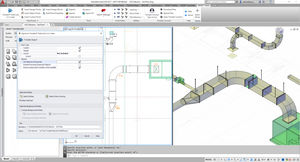
PipeCad is the most advanced software for the Piping System Design with graphic input AutoCAD® compatible.
Fully integrated in the Mc4Suite 2009, PipeCad possesses great ease for input, automatically selects and sizes all fittings, and can quickly create and render different design views and legends. This easily reduces the time needed to produce a boiler room executive drawing and is why it represents the pinnacle of design productivity.
|
|
|
TurboCAD Mac PRO is a professional CAD application that enables users to create innovative designs for a wide range of industries and disciplines. It’s both feature and content rich, packed with professional level 2D drafting tools, 3D modeling tools, and thousands of parts, symbols and floorplans. TurboCAD Mac Pro also offers feature-rich photorealistic rendering, animation and superior interoperability. Developed for the needs of designers, mechanical and industrial engineers, architects, builders, and contractors will find it an excellent drafting companion.
|
|
|
TurboCAD Pro 16 is the premium design software solution that’s delivered exceptional value to both 2D and 3D users for over twenty years. It’s complete 2D drafting and 3D surface and solid modeling toolset includes many of the most advanced technologies in the industry—ACIS® solid modeling, D-Cubed constraints, and Lightworks® photorealistic rendering. Expert tools for architectural and mechanical design offer greater productivity and enhanced workflow, as does interoperability with nearly 40 CAD and graphic formats.
|
|
|
|
|
|
Allplan Steel Design is a marriage between Scia Engineer and Allplan, giving access within Allplan to all modelling facilities of Scia Engineer concerning steel structures. By using templates or by direct modelling, Allplan users get access to an extensive set of tools for virtual prototyping & intelligent modelling of steel structures. In your familiar Allplan environment, with objects such as brickwork walls, concrete columns, system floors, glass windows, steel built-in elements, ... it is now possible to work with steel templates. Make your choice out of the many parameterised templates and model your steel structure, connections included. It is not only possible to modify the model by retrieving and adapting its parameters in Allplan, but also to alter it in Scia Engineer. For example, after having performed a profile optimisation in Scia Engineer, the changes are immediately visible in Allplan.
As before, it is possible to generate views and cuts from the Allplan model. Since the model is also an Scia Engineer project, the automatic overview drawings or detail drawings from the CAE software can be used too.
Allplan Steel Design is available on 4 levels: the library of steel templates, the modeller for creating your own construction in Scia Engineer and for reading it in Allplan afterwards, parametric design for parameterising your own constructions (e.g. staircase on the above picture on the right) and the entire Scia Engineer program, not only for modelling but also for performing the static analysis.
|
|
| ... products without information |
| |
|
Create the perfect outdoor living experience for you and your family with beautiful landscaping with gardens, decks, pathways and sheds. Select from over 7,500 plants, flowers, shrubs and trees to create the look you want. Then watch them grow by changing their age, or see what they'll look like through the seasons.
|
|
Software in order to personalize the new plates HAIL Personal.
Thanks to this completely free software you directly will have the possibility to realize them your plates, you will have of the points light totally YOURS!
|
|
|
|